Most of the pages AI answers cite are not new. Seer Interactive looked at 47,097 citations in ChatGPT, Gemini and Perplexity between March and June 2026. Of the 7,683 pages it could put a date on, 75% of the cited pages had been updated within the past year. More than a quarter of those fresh pages were first published over two years ago. Somebody simply kept them up to date. The study covered searches around four brands and shows a pattern, not proof that an update causes a citation. But it does show that age alone does not knock a page out of the race.
That is good news if you have an archive. The post you wrote in 2021 can still be the one Google ranks and ChatGPT names as a source, and you already did the hard part: the trip, the research, the photos, the first draft. An update is also the easiest way to break a post that works, though. So this guide covers both sides. Which posts to update first, what to change, what to leave alone, and how to tell a few weeks later whether it worked.
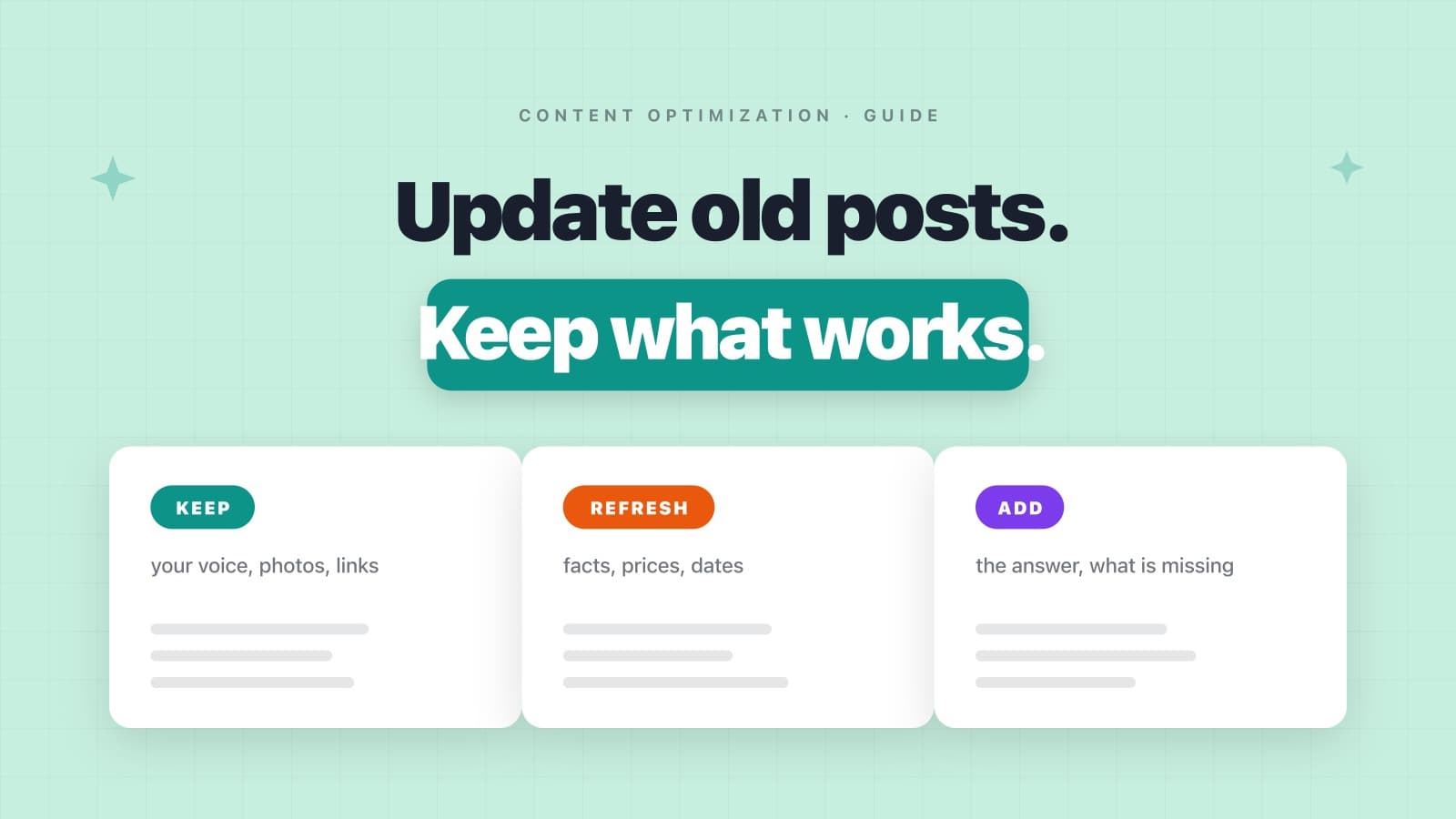
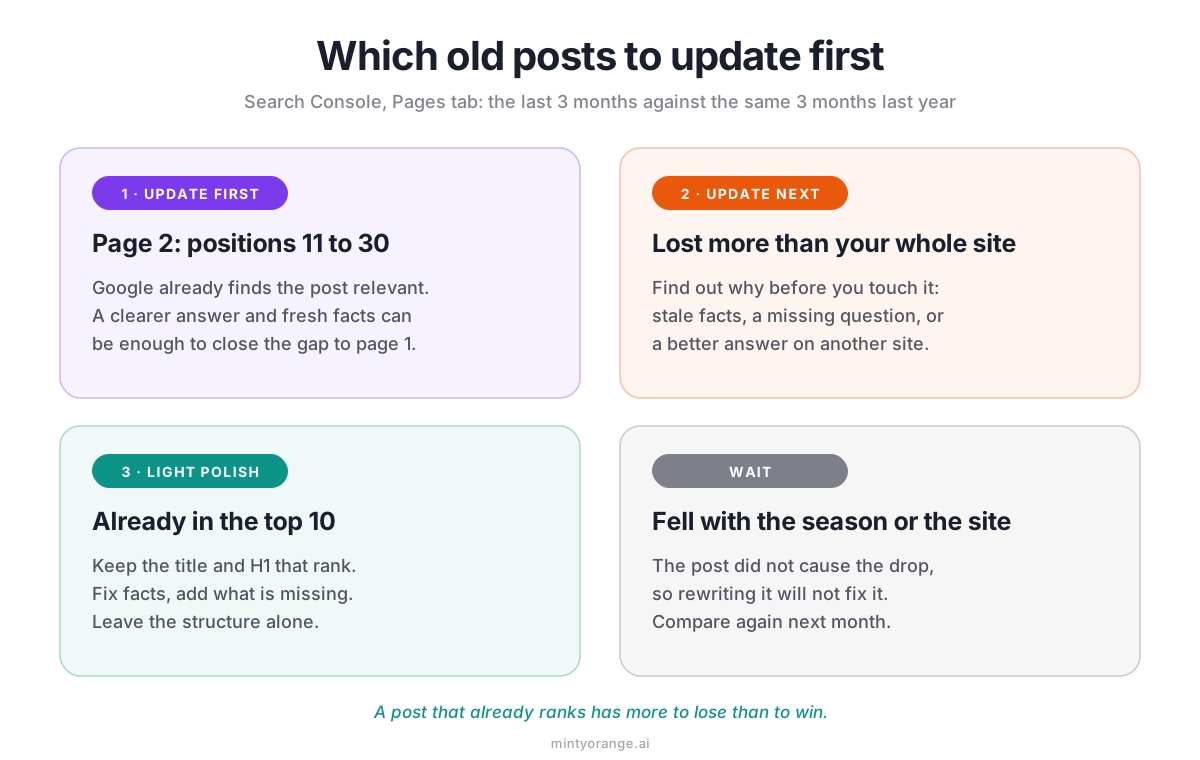
- Start with posts on page 2 of Google (positions 11 to 30), then posts that lost more than the rest of your site against the same weeks last year.
- Top 10 posts get a light polish. Keep the title and H1 that rank, fix facts, add what is missing.
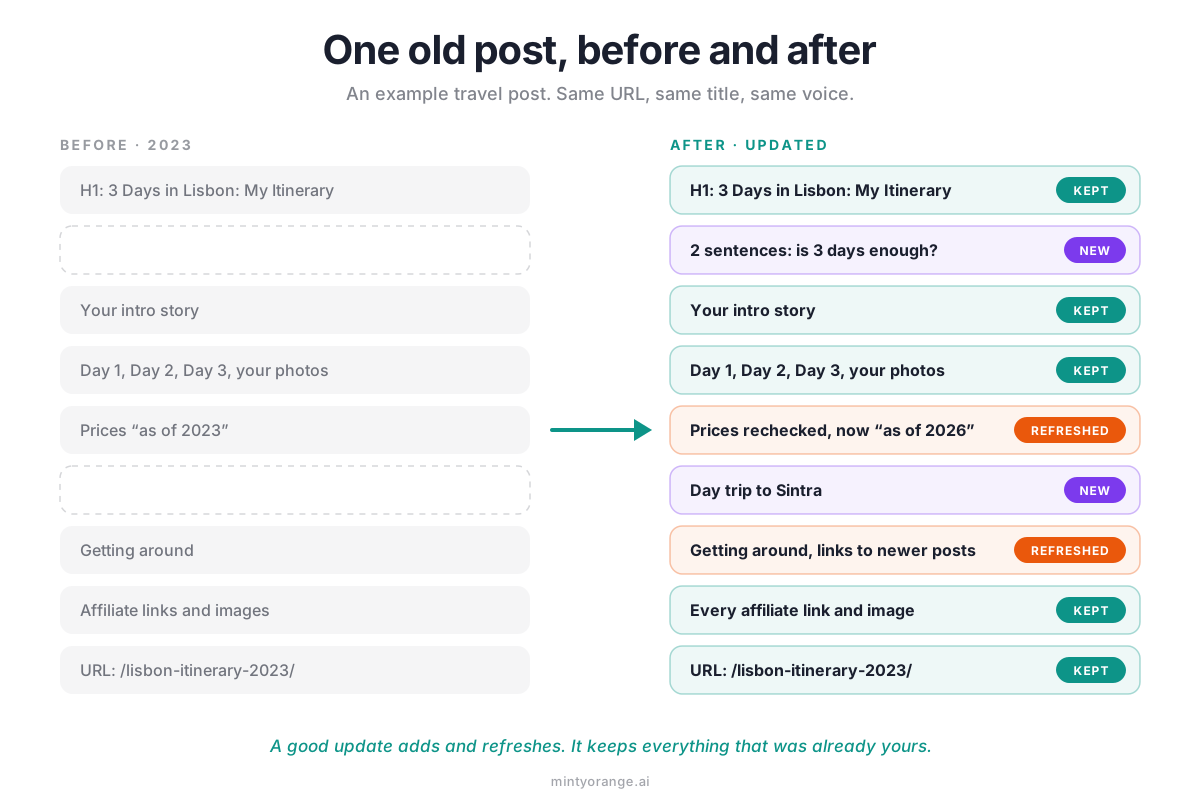
- Answer the title’s question at the top, refresh the facts that expire, and add the questions the top results cover and you don’t.
- Keep what only you have: your experience, photos and voice, plus every affiliate link, image and internal link.
- Skip the year bump without new content, the new URL, and schema or llms.txt as a way into AI answers.
- Measure per post in Search Console a few weeks later, and ask ChatGPT, Perplexity and Google AI Mode your key questions by hand.
Step 1: Find the Posts Worth Updating First
Don’t start with the post you like least. Start in Google Search Console: open Performance, then Search results, and switch to the Pages tab. Every post on your site is a row with its clicks, impressions and average position.
Now set the date filter to Compare and pick the last 3 months against the same 3 months last year. Not the last 28 days against the 28 days before, because two things fool that short comparison:
- ✓Seasons. A Christmas market post always looks terrible in January next to December. That is the calendar, not your post.
- ✓Site-wide drops. When a Google update hits your whole site, every post looks like it is falling at once. A post that lost the same share as the site did nothing wrong.
So compare each post with your site as a whole. Say your whole site is down 20% against last year and one post is down 60%: that post is your signal. If it is down 20% like everything else, rewriting it will not bring the site back. And before you blame a post, open Google’s Search Status Dashboard. It lists every core and spam update with its start date, so you can see whether a drop lines up with one.
Page 2 Has the Most Room
Then sort by position. Posts that sit around positions 11 to 30, on page 2 and the top of page 3, are your best candidates. Google already considers them relevant for the search and simply ranks a few pages above them. A clearer answer, current facts and the one question you never covered can be enough to close that gap.
Top 10 Posts Get a Light Polish
A post that already ranks on page 1 has more to lose than to win. Keep the title and the H1 that rank, and keep the structure and the order of your sections. Fix what went out of date, add a missing piece where it fits, and leave the rest alone. A full rebuild of a page that works trades a sure thing for a maybe.
Further Back? Check the Topic First
Posts beyond position 30 can be worth it too, but they usually need more than a refresh. Check first whether the post answers what people search for, then decide between a real rebuild and leaving it for later.
Step 2: What to Change
Now take one post at a time and read it like a stranger who just typed the search into Google. Six things are worth your time.
Answer the Question Your Title Promises, at the Top
If your title asks how many days you need in Lisbon, the first two sentences under the H1 should say how many days. The story of your flight can come right after. Readers who want the answer get it, and so do AI answers: in Kevin Indig’s analysis of 1.2 million ChatGPT answers from February 2026, 44.2% of the citations came from the first 30% of a page. You don’t need to rewrite your intro. Put the answer in front of it.
Refresh the Facts That Expire
Prices, opening hours, ticket rules, routes, product versions: anything that changes with time. Recheck each one at the source and fix what moved. Then be strict about the label. Change a “last updated” date or an “as of 2024” only when the facts underneath really changed. An “as of 2026” over prices you never rechecked tells your readers you did something you didn’t.
Add What the Top Results Cover and You Don’t
Search your keyword, open the top 5 results and note the questions they answer that your post skips. The “People also ask” box helps too. Every real gap gets a short section, written from what you know. Don’t copy their outline. Google’s own guide to AI search warns against content that just recycles what others have already said.
Keep What Only You Have
Your first-hand experience, your photos, your opinions, your voice: an update should never sand these down. Google’s guide calls generic advice like “7 Tips for First-Time Homebuyers” commodity content, and says that unique, useful content will likely shape your presence in AI search in the long run “more than any of the other suggestions in this guide.” The price you paid, the trail that was closed, the mistake you made on day one... that is the part nobody can copy. The same guide recommends high-quality images and video, so keep your own photos, and add one where a section has none. We wrote more about why original detail wins.
Keep Every Link, Image and Affiliate Link
Rewrites lose things quietly. A paragraph gets rephrased and the affiliate link inside it is gone. Two sections get merged and a photo disappears. Nobody notices, because missing things are invisible. Before you hit Update, put the old and the new version side by side and count: same affiliate links, same images, same embeds, same internal links.
If ChatGPT or another AI tool helps with the rewrite, check every fact and number it adds against your own notes. Google’s guidance on AI-generated content, updated on October 1, 2026, calls it critical to fact-check AI output by hand before you publish. These tools are very good at sentences that sound right.
Link to Your Newer Posts
An old post was written before your newer posts existed, so it can’t point to them. Add 2 or 3 links to newer posts on the same topic, where a reader would want them, on words that already stand in your sentence. Don’t write a new sentence just to place a link. It reads like an ad.
Step 3: What Not to Bother With
Some update advice costs a lot of time and changes nothing for your readers. Four things you can skip.
Bumping the Year in the Title
Changing 2024 to 2026 in the title while the post stays the same is not an update. Readers click, find last year’s prices and leave. If you really updated the post, a new year in the title is fair. On its own, it is a new label on the same page.
Changing the URL
Leave the slug of an indexed post alone, even if it contains an old year. A new URL needs a redirect, every link that points to the post now runs through that redirect, and no reader gains anything from it. The update happens on the page, not in the address bar.
Schema Markup and llms.txt as Your Way Into AI Answers
Both get sold as AI tricks, and the 2026 data backs neither one. Ahrefs tracked 1,885 pages that added schema markup between August 2025 and March 2026, compared them with 4,000 similar pages, and found no major uplift in AI citations on any platform (May 11, 2026). For llms.txt it is even clearer: of roughly 38,000 domains with a valid file, 97% saw not a single request for it in May 2026 (Ahrefs, June 15, 2026). And Google’s guide says plainly that structured data isn’t required for AI search and that you don’t need special AI files.
Keep the schema your SEO plugin already adds, because it can still help you qualify for rich results in Google. Just don’t spend an afternoon on it for AI. Our GEO checklist goes through the rest of the folklore.
Rewriting Everything “for AI”
There is no special AI writing style. Google’s guide says you don’t need to write in a specific way for generative AI search, because AI systems understand synonyms and meaning. Write for the person who typed the search.
Step 4: How to Tell Whether It Worked
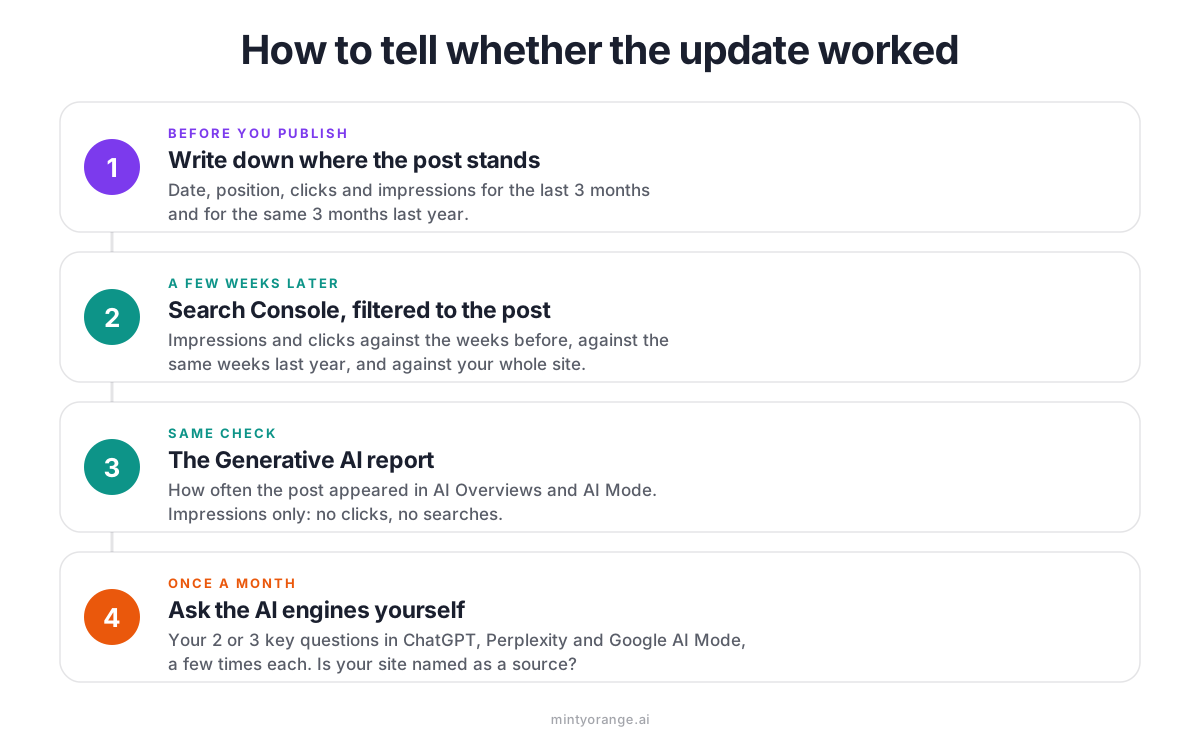
On the day you publish an update, write down the date and what you changed. A short note per post is enough. Without it, you won’t remember in six weeks which post got which fix.
Search Console, Per Post
Give Google a few weeks. If you want it to see the update sooner, paste the URL into URL Inspection in Search Console and click Request Indexing. Then open the Pages tab, click the post to filter on it, and compare the weeks since the update with the same number of weeks before. Then with the same weeks last year. Then hold it against the whole site, exactly like in Step 1. Watch impressions as well as clicks: they show whether Google shows the post more often at all.
The Generative AI Report
Search Console also counts how often your pages appear in Google’s AI Overviews and AI Mode. Google rolled the report out to all websites worldwide on August 31, 2026. It shows impressions by page, country, device and date. It shows no clicks and no searches, so read it as visibility, not as traffic. Our guide to the report shows where to find it.
It also tells you what kind of post gets picked. On nomadmum.com, the travel blog behind Minty Orange, the pages AI answers reached for most were the specific ones: what to wear in Thailand, which headphones work for a baby on a plane, which waterfall on which island. The broad ultimate guides did not make the top of the list.
Ask the AI Engines Yourself
Search Console only covers Google. For ChatGPT and Perplexity, the simplest check is to ask. Pick the 2 or 3 questions your post answers best and type them into ChatGPT, Perplexity and Google AI Mode. Note whether your site shows up as a source. Ask each question more than once: in a September 2026 study, about 15% of yes-or-no citation decisions changed when the exact same input was run again. One answer is a snapshot. The trend over a few months is the result. Here is our step-by-step version of the hand check.
Doing It With Minty Orange
This routine works, and it is slow. One post can easily take an afternoon, and most archives have dozens waiting. That is the job we built Minty Orange for.
You paste the post’s URL and your keyword. Minty Orange compares the post with the live Google results for that search, in any of 26 countries, and rebuilds it section by section in your voice. It follows the rule from Step 1: a post that already ranks on page 1 with real traffic keeps its title, headline and sections. Your links, images and affiliate links are protected, and across 585 optimizations in 2026, 99.4% of protected links, images and embeds came through unchanged. Any number the rewrite adds that it cannot find in your own article is struck, sentence and all, or flagged for you to check.
In WordPress, the free plugin shows every change as its own card: accept it, skip it, or undo it later. And for every article you track, it checks whether ChatGPT, Perplexity and Google AI Mode cite you, automatically on the 1st and 15th of each month.
Key Takeaways
- ✓Pick posts with data: page 2 first, then posts that lost more than your whole site against the same weeks last year.
- ✓Give top 10 posts a light polish. Keep the title and H1 that rank.
- ✓Answer the title’s question at the top, refresh the facts that expire, add the questions you skipped, and keep your experience, photos and every link.
- ✓Skip the year bump, the new URL, and schema or llms.txt as AI tactics.
- ✓Measure per post in Search Console and by asking the AI engines yourself, more than once.
Questions
Frequently Asked.
There is no fixed schedule. Update a post when its facts change, when it slips to page 2, or when it loses more clicks than the rest of your site against the same weeks last year. For posts with prices, opening hours or rules, a yearly check is a good habit. Seer Interactive found that 75% of the pages ChatGPT, Gemini and Perplexity cited between March and June 2026 had been updated within the past year. That is a correlation, not a rule, but it says that most pages AI answers use are kept up to date.
It can, when the update makes the post more useful: a direct answer at the top, current facts, and the questions searchers ask that you had not covered yet. A new date or a new year in the title on its own changes nothing for the reader. Be careful with posts already in the top 10. Polish them, don’t rebuild them, because a page that ranks has more to lose than to win.
Yes, when you made a real update. Show a visible “Last updated” date and keep the original publish date. Google’s documentation on byline dates says its systems estimate when a page was published or significantly updated, and that the date should describe the page itself, not the events in it. A typo fix is not an update. The same goes for “as of” labels on prices: change them only after you rechecked the facts.
No. Keep the slug of an indexed post, even if it contains an old year. A new URL needs a redirect, every existing link to the post has to go through it, and readers gain nothing from it. Put the effort into the page instead.
If you already have a post that answers the same question, update it. A second post on the same search can compete with the first, and you split your own visibility between two pages. Write a new post when the question is different, not just the year.
Give it a few weeks before you judge. Google has to crawl the updated page first, and you can nudge that with URL Inspection and Request Indexing in Search Console. Then compare the post’s impressions and clicks with the weeks before and with the same weeks last year, and check the Generative AI report for its AI Overview and AI Mode impressions. One week of data tells you almost nothing.