Am I Accidentally Blocking AI Bots From Crawling My Site?
There is a good chance you are. For bloggers and small publishers, the two most common culprits are WordPress security plugins (Wordfence, Sucuri, All-In-One Security) with aggressive bot-blocking defaults, and robots.txt rules that use broad wildcards. If you happen to be on Cloudflare or a custom JavaScript stack, there are two more places to check. The fix takes five minutes once you know where to look.
Why This Matters More Than You Think
You can write the best-structured article on the internet. You can nail the first 60 words, add a clean FAQ, follow every step in the 8-step guide to getting cited by AI. None of it matters if the AI bot can’t reach your page.
This is the technical equivalent of locking the front door and wondering why nobody comes in. And unlike most technical SEO problems, this one is completely silent. There is no warning in Google Search Console. No error message in your CMS. Your Google rankings look fine. The only symptom is that ChatGPT, Perplexity, and Google AI Overviews never cite you, and you have no idea why.
I have seen bloggers spend weeks optimizing their content structure while their WordPress security plugin was quietly blocking OAI-SearchBot as an “unknown bot.” The optimization work was good. The bots just never saw it.
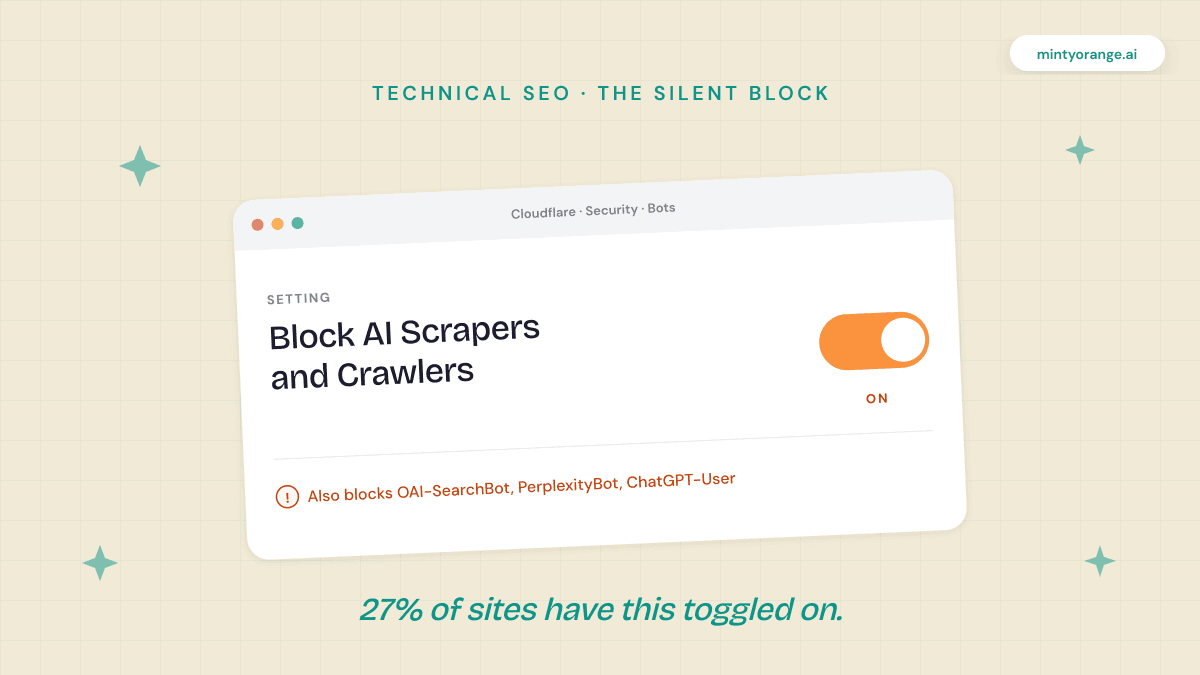
How common is this? Parse audited roughly 3,000 sites (mostly B2B and e-commerce) and found that 27% blocked at least one major LLM crawler, most of it at the CDN or firewall layer where nobody on the content side ever looks.
The Bot Taxonomy You Need to Understand
Here is where most of the accidental blocking happens. Publishers hear “block AI bots” and assume all AI bots do the same thing. They do not. There are two fundamentally different categories, and blocking the wrong one is the mistake.
Training Bots
Training bots crawl your site to collect data for training future AI models. This is the IP concern most publishers are worried about, and blocking these is a legitimate decision.
- ✓GPTBot (OpenAI): trains future models. Not involved in real-time search.
- ✓Google-Extended (Google): opt-out for AI model training. Does not affect Google Search or AI Overviews.
- ✓ClaudeBot (Anthropic): trains Claude models.
- ✓CCBot (Common Crawl): large-scale data collection used by multiple AI companies.
Search and Retrieval Bots
Search and retrieval bots crawl your site to index content for real-time AI search answers. If you block these, you disappear from AI search results entirely.
- ✓OAI-SearchBot (OpenAI): powers ChatGPT’s live search. Block this and you cannot appear in ChatGPT answers. Period. Per OpenAI’s documentation, sites opted out of OAI-SearchBot will not be shown in ChatGPT search answers.
- ✓ChatGPT-User (OpenAI): fires when a real user asks ChatGPT to look at a specific URL. Blocking this kills direct user-initiated fetches.
- ✓PerplexityBot (Perplexity): indexes for Perplexity search. Block it and Perplexity cannot cite you.
- ✓Claude-SearchBot (Anthropic): Anthropic’s retrieval crawler for Claude’s search features.
- ✓Googlebot (Google): still required for AI Overview eligibility. If Googlebot can’t crawl you, AI Overviews can’t cite you either.
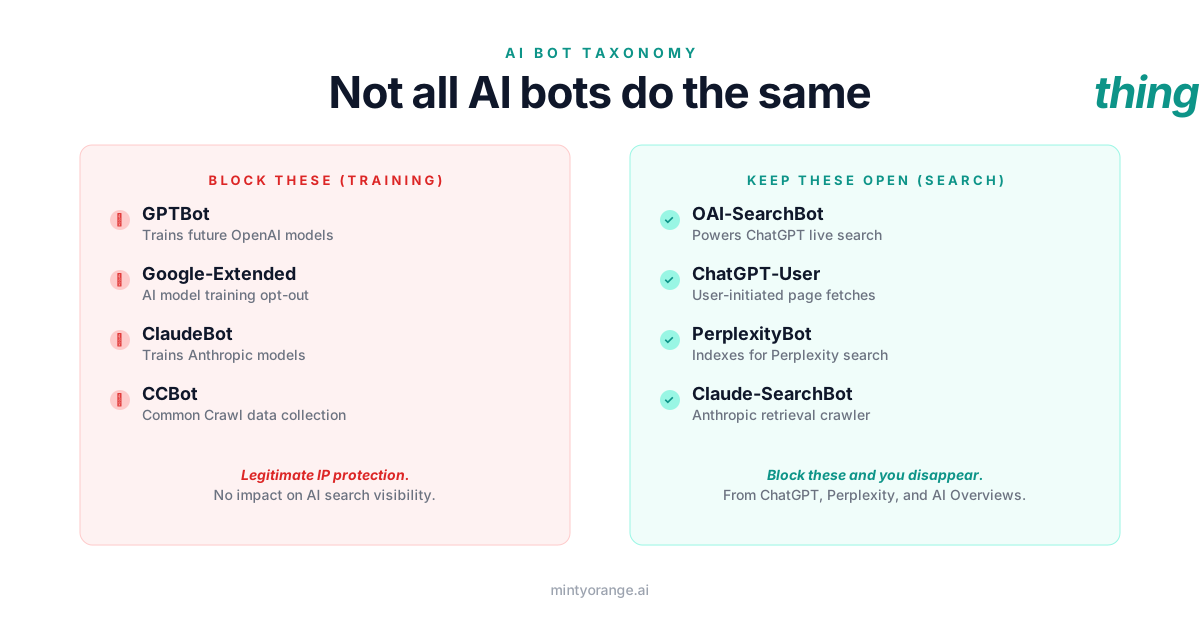
The distinction matters because you can block training bots (legitimate IP protection) while keeping search bots open (so AI engines can still cite you). Most accidental blocking happens when publishers treat all AI bots as one category.
Where Bloggers Accidentally Block AI Bots
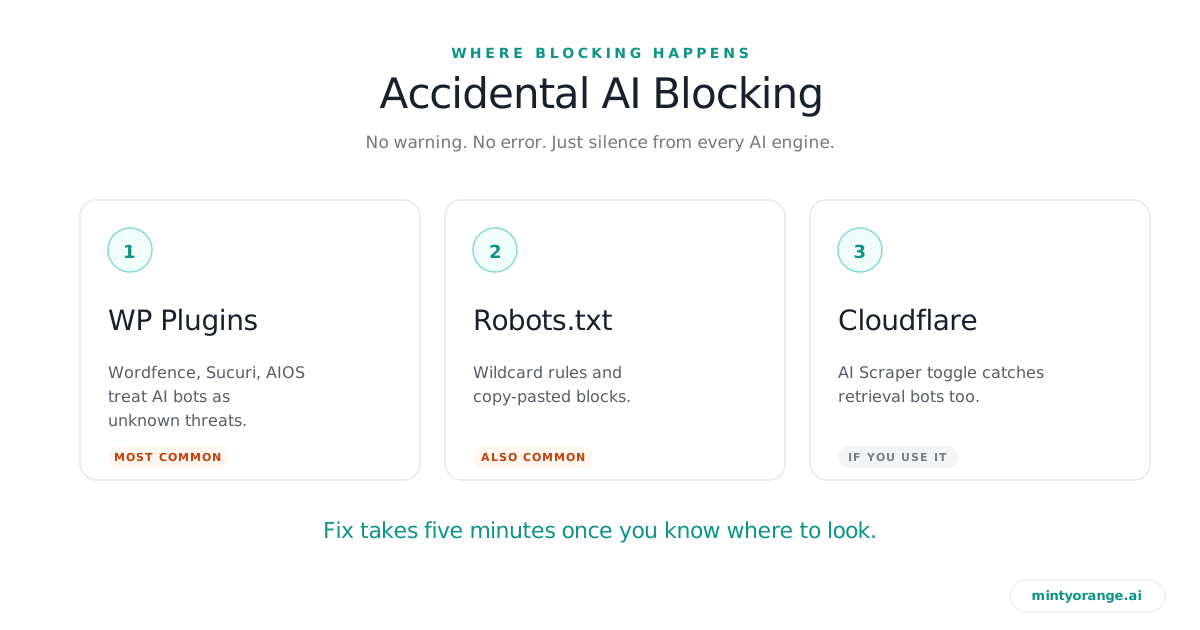
1. WordPress Security Plugins
If you’re on WordPress, this is the single most likely culprit. Wordfence, Sucuri, All-In-One Security, iThemes/Solid Security and similar plugins all have bot-blocking features. Some block known bots by default. Others have “aggressive bot protection” modes that flag any non-standard user agent.
AI search bots are still relatively new user agents. Some plugins treat them as “unknown bots” and quietly throttle or block them. You will not get a notification when this happens. The first symptom is no AI citations.
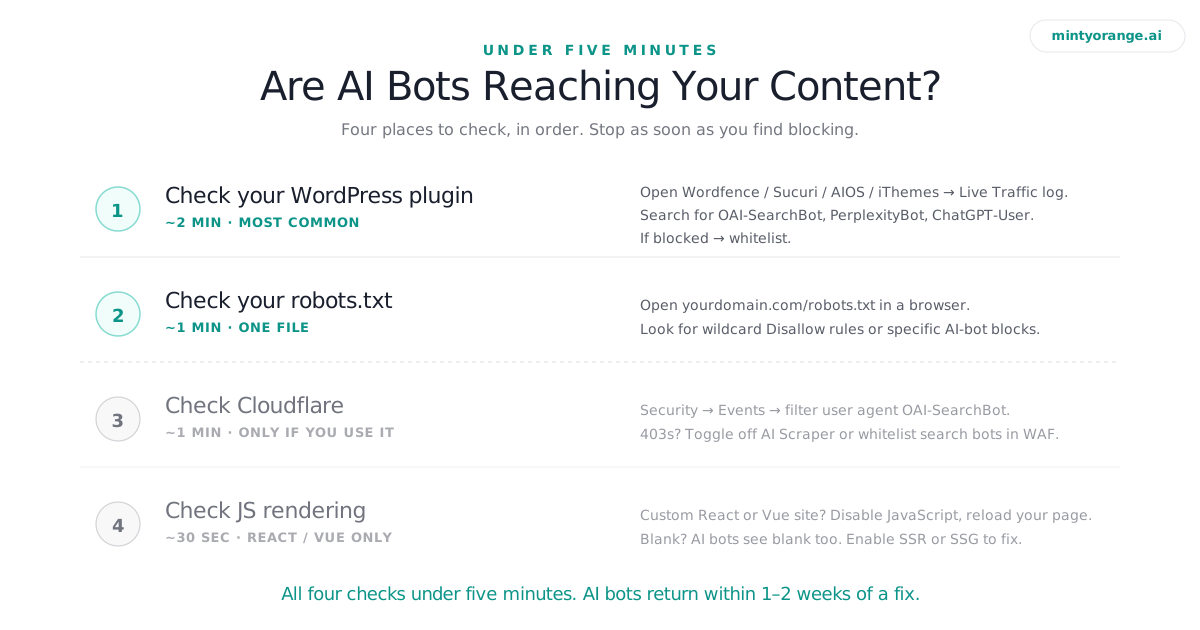
How to check (Wordfence): WP Admin → Wordfence → Tools → Live Traffic. Search for OAI-SearchBot, PerplexityBot, ChatGPT-User, Claude-SearchBot. If they appear as “Blocked,” fix it under Wordfence → Firewall → All Firewall Options → Advanced Firewall Options → Whitelisted services.
How to check (Sucuri): WP Admin → Sucuri Security → WAF (Firewall) → Settings → Allowlist. Add the four search-bot user agents above. Sucuri also keeps an audit log at Sucuri Security → Last Logins / Audit Logs that can surface blocked requests.
How to check (All-In-One Security / AIOS): WP Admin → WP Security → Firewall → User Agent Blocking tab. If any AI bot UA strings are listed here, remove them. Then check Firewall → Blocked IPs and the Logs section for any 403s served to AI bots.
How to check (iThemes / Solid Security): WP Admin → Solid Security → Tools → Block List. Look for User-Agent based bans and remove any matching the four search bots. Also check the Solid Security log under Logs → Lockouts.
The fix is universal: add the four AI search bot user agents to your plugin’s allowlist / whitelist. OAI-SearchBot, ChatGPT-User, PerplexityBot, Claude-SearchBot. Five minutes, no developer required.
2. Robots.txt Rules
This one is more obvious, but the mistakes are subtle. The most common issues:
Broad wildcard blocks. A User-agent: * with aggressive Disallow rules applies to every bot, including AI search crawlers. If you have User-agent: * followed by Disallow: /, you have blocked everything. Including every AI bot.
Blocking by company instead of by bot. Some robots.txt files block “OpenAI” broadly. That catches OAI-SearchBot alongside GPTBot. You lose training protection and search visibility in one move.
Copy-pasted blocks from blog posts. The internet is full of “how to block AI bots” articles that provide robots.txt snippets without distinguishing between training and search bots. Publishers copy-paste them without understanding what they are actually blocking.
How to check: open yourdomain.com/robots.txt in your browser. Look for any rules mentioning OAI-SearchBot, PerplexityBot, ChatGPT-User, or broad wildcard disallows. If you see Disallow: / under any of those agents, you have a problem.
A safe starting point for your robots.txt:
# Allow AI search bots (citations)
User-agent: OAI-SearchBot
Allow: /

User-agent: ChatGPT-User
Allow: /

User-agent: PerplexityBot
Allow: /

User-agent: Claude-SearchBot
Allow: /

User-agent: Googlebot
Allow: /

# Block AI training bots (IP protection)
User-agent: GPTBot
Disallow: /

User-agent: Google-Extended
Disallow: /

User-agent: ClaudeBot
Disallow: /

User-agent: CCBot
Disallow: /
This is not the one universal robots.txt. It is a starting point that reflects the split between training and search bots. Adapt it to your situation.
3. Cloudflare’s “AI Scraper” Toggle (only if you use Cloudflare)
Most bloggers on shared hosting (Bluehost, SiteGround, Hostinger, Kinsta) don’t have Cloudflare in front of their site. If that’s you, skip this. If you do use Cloudflare, this is worth a one-minute check.
Cloudflare added an “AI Scrapers and Crawlers” toggle under Security → Bots (or “Control AI Crawlers”). The name implies it only blocks scrapers, but when enabled it can block retrieval bots alongside training bots. If the toggle is on, check Security → Events for 403 responses on OAI-SearchBot and PerplexityBot.
The fix: either turn the toggle off, or create custom WAF rules that block specific training bots (GPTBot, ClaudeBot, CCBot) while allowing search bots. Cloudflare’s WAF supports user-agent rules. Five minutes.
4. JavaScript Rendering (only if you’re on a custom stack)
If your blog runs on WordPress, Ghost, Squarespace, Wix, or Blogger, skip this. Your content is server-rendered, AI bots see it fine. This one is only for custom React/Vue/Next.js builds without server-side rendering.
Vercel and MERJ analyzed over 500 million AI crawler fetches in late 2024 and found that no major AI crawler executes JavaScript: GPTBot, ClaudeBot, and PerplexityBot all read the raw HTML only (Gemini is the exception, it crawls through Google’s rendering infrastructure). If your site relies on client-side rendering, AI bots land on a blank shell and index nothing. Quick check: open your site in Chrome with JavaScript disabled (DevTools → Settings → Preferences → Disable JavaScript). If the page is blank, AI bots see blank too. The fix is a development task (enable SSR or SSG), not a five-minute change.
How to Verify Everything Is Working
Once you have fixed any blocking issues, confirm that bots are actually reaching your pages. Lead with the checks any blogger can run today, no shell access required.
Manual engine checks. Open ChatGPT, Perplexity, and Google in incognito. Ask the question your article answers. See if you show up. Try three different phrasings across two days. This is still the most reliable single check, and it costs nothing.
Bing Webmaster Tools. ChatGPT’s search blends Bing’s index, OpenAI’s own crawl, and Google-aligned results, so Bing is one door in rather than the gate it was in 2025. It still feeds Copilot, and its AI Performance report (live since February 2026) shows which of your pages Copilot cites. Free, 20 minutes, worth having. The higher-leverage check is that OAI-SearchBot gets a 200 from your firewall, not a 403.
Google’s URL Inspection Tool. For AI Overview eligibility, check that Googlebot can render your pages. The URL Inspection tool in Google Search Console shows you exactly what Googlebot sees.
Server logs (advanced). If your host gives you raw access logs (cPanel “Raw Access,” Plesk logs, or SSH), filter for OAI-SearchBot, PerplexityBot, and ChatGPT-User: grep "OAI-SearchBot" access.log. 200 responses mean you’re in the clear. The citation tracking guide covers this in more detail.
Key Takeaways
- ✓For bloggers, the biggest silent blocker is your WordPress security plugin. Wordfence, Sucuri, AIOS, iThemes. Check the live traffic log for OAI-SearchBot and PerplexityBot.
- ✓Training bots and search bots are different. Block GPTBot for IP protection. Keep OAI-SearchBot open for ChatGPT visibility. They are independent systems.
- ✓Robots.txt wildcards are the second most common issue. A
User-agent: *withDisallow: /hides you from every AI bot at once. - ✓Cloudflare is an edge case for most blogs. Only worth checking if you actually use Cloudflare in front of your site.
- ✓JavaScript rendering only matters for custom React/Vue stacks. WordPress, Ghost, Squarespace, Wix and Blogger users can skip this.
- ✓The single best verification is a manual engine check. Ask ChatGPT, Perplexity and Google your article’s question in incognito. Five minutes, zero tools.
Where This Fits Around Minty Orange
Minty Orange optimizes the content side of AI search visibility: structure, extractable answers, schema, source citations, and per-engine readiness. All of that work assumes one thing: that AI bots can actually reach your pages. If they can’t, no amount of content optimization helps.
That’s why the 5-minute diagnostic above is our recommended pre-optimization check. Plugin allowlist clean, robots.txt sane, no surprises in Cloudflare if you use it. Then run the content work, and the bots that visit will actually have something worth citing.
It is a binary check with a binary fix. Either the bots can reach your content, or they cannot. Run the diagnostic first. The content work pays off after.
Questions
Frequently Asked.
No. GPTBot is OpenAI’s training crawler. It has no relationship to Googlebot or Google’s ranking algorithm. Blocking GPTBot will not affect your Google Search rankings. It will, however, prevent your content from being used to train future OpenAI models. This is separate from OAI-SearchBot, which powers ChatGPT’s live search results.
Log into Cloudflare and go to Security > Firewall Events. Filter by user agent for OAI-SearchBot, PerplexityBot, and ChatGPT-User. If you see 403 (blocked) responses for these bots, your Cloudflare settings are preventing AI search engines from reaching your content. Check the “AI Scrapers and Crawlers” toggle under Security > Bots.
GPTBot collects content to train future OpenAI models. OAI-SearchBot indexes content for ChatGPT’s real-time search answers. They are completely independent systems. Blocking GPTBot is an IP protection decision. Blocking OAI-SearchBot removes you from ChatGPT search results entirely. You can block one without affecting the other.
Yes. Block GPTBot (training) and allow OAI-SearchBot (search). These are separate crawlers with separate purposes. Per OpenAI’s documentation, only OAI-SearchBot opt-out status determines whether you appear in ChatGPT search answers. Your GPTBot directive has no effect on citations.
No. WordPress is server-rendered by default, so AI bots see your content fine. The JavaScript rendering problem only affects custom React, Vue, or Next.js builds without server-side rendering enabled. Ghost, Squarespace, Wix and Blogger are also server-rendered. If you can read your post with JavaScript disabled in your browser, AI bots can too.
Perplexity has repeatedly faced criticism for not consistently respecting robots.txt, most recently in Cloudflare’s August 2025 report on stealth crawling. Perplexity’s own documentation says PerplexityBot follows robots.txt directives, but the track record is worth knowing. If you want Perplexity to access your content, explicitly allow PerplexityBot in your robots.txt with “User-agent: PerplexityBot” followed by “Allow: /”.
Most AI search crawlers revisit sites within days to weeks. OAI-SearchBot typically recrawls indexed pages every few days. After removing a block, you should see bot traffic return within one to two weeks. You can monitor this through server logs filtered for the relevant user agents.